
Flight Alerts, Fare Calendars, and Flexible Dates: Tools for Finding Cheaper Airfare
Learn how fare calendars, price alerts, and flexible date searches work — and how to use them to reduce your flight costs.
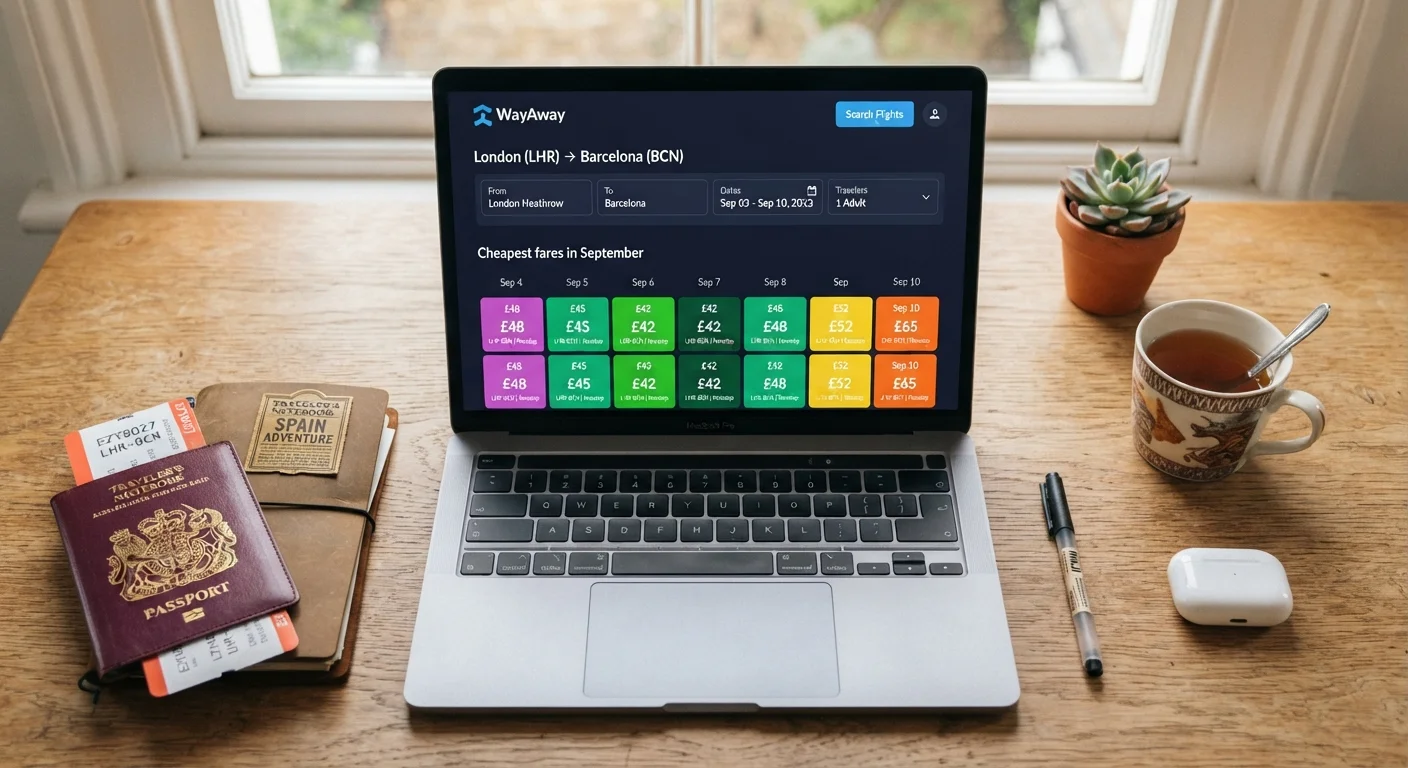
Photo: SummarizedReads.net | Just Read It! editorial
—— In This Article
Key Takeaways
- Fare calendars display price variation across dates, helping you spot cheaper travel windows quickly.
- Price alerts notify you when fares drop on a specific route, so you don't have to monitor consistently.
- Flexible date searches can reveal meaningful savings by shifting departure by just a day or two.
- No single tool guarantees the lowest price — combining two or three approaches produces more reliable results.
- Base fares don't include fees; always compare total costs before booking.
How These Tools Actually Work
Fare calendars, price alerts, and flexible date searches are all built on the same underlying data: real-time pricing pulled from airline inventory systems. Understanding what each tool does — and where it falls short — helps you use them more effectively.
Fare calendars query prices for every day in a given month and display them in a grid. They're fast for spotting patterns but don't always show the absolute lowest fare, especially for airlines that don't share full inventory with aggregators.
Price alerts run a saved search on a schedule and notify you when the fare changes meaningfully. They're most useful once you've done initial research and know roughly what a route should cost. Without that baseline, it's hard to know whether a 'drop' is actually a deal or just routine fluctuation.
Flexible date searches show you fares across a range of dates in a single query. Some tools extend this to nearby airports or open-ended destination searches. They save time compared to manually adjusting dates one by one, but they're a starting point — you should still verify the fare on the airline or booking source directly.
None of these tools is a guarantee of the lowest price. They're research instruments. Used together, they give you a much clearer picture of a route's pricing behavior than a single point-in-time search. Before you get deep into airfare research, it also helps to know your actual budget ceiling — our article on setting a realistic travel budget covers how to estimate your true trip costs upfront.
Flight search engine with fare calendar
Displays price variation across a full month so you can identify cheaper date combinations at a glance.
Price alert feature or app
Sends notifications when fares on a chosen route drop below a threshold you set or a detected price change.
Flexible dates or 'explore' search mode
Shows fares for a range of departure dates or nearby airports in a single view, useful for open-ended planning.
Spreadsheet or notes app
Tracks fare observations over time so you can judge whether a price is genuinely low or just typical for that route.
Step-by-Step: Using the Tools Together
The steps below walk you through a practical workflow — from initial research to booking — using fare calendars, alerts, and flexible searches in sequence. Follow them in order for a new trip, or jump to the step that matches where you are in your planning.
What you will need
Define your flexibility range before searching
Before opening any tool, decide how flexible you actually are. Can you shift your departure by three days in either direction? Would a Saturday departure instead of Friday work? Write down your hard limits — events, work commitments, or return deadlines — and your soft range, the dates you could accept if the price difference is significant. Having this clarity prevents you from chasing prices that aren't actually usable.
Use a fare calendar to map price patterns
Open a flight search tool that offers a calendar or grid view — most major search engines have one. Enter your origin and destination, then switch to the calendar display. You'll see prices color-coded or numbered across each day of a month. Look for clusters of lower prices and note whether they fall on specific days of the week or near midweek versus weekend travel. This gives you a map of the route's price behavior, not just a single quote.
Don't assume the cheapest day shown is always the best deal — cross-check the same date on the airline's own site, since prices can differ.
Set up price alerts on your target route
Once you've identified a realistic travel window, set a price alert. Most flight search tools allow you to track a route and receive an email or push notification when the fare changes. Enter your origin, destination, and approximate travel dates, then activate the alert. You don't need to book immediately — the alert system monitors prices on your behalf so you can step away from the search.
Set alerts on more than one tool if you can, as different engines pull from different data sources and may catch different sale events.
Run a flexible-date or 'explore' search
If your destination isn't fixed, use an explore or map-based search mode. Enter your origin and a budget range or travel month, and the tool will surface destinations with fares in that range. This is especially useful when your goal is a trip — not necessarily a specific city — and you're open to where the value is on a given month.
If your destination is fixed but your dates are flexible, use the '+/- 3 days' or 'whole month' search option to compare fares across a range in one view rather than manually adjusting dates one by one.
Compare total costs, not just base fares
When a fare alert fires or you spot a low calendar price, don't stop at the headline number. Add baggage fees, seat selection charges, and any carrier-imposed extras before comparing. A fare that looks lower can end up costlier once fees are included. Our guide on airline add-on costs walks through which extras most commonly inflate a base fare.
Also verify the total in a separate browser window or incognito tab — some tools adjust displayed prices based on search history.
Decide on a target price and act when it's met
After researching, write down a price you'd be satisfied booking at — not the absolute minimum you've ever seen, but a realistic number based on the fare patterns you observed. When your alert fires at or below that number and the total cost checks out, book it. Waiting indefinitely for a lower fare is a common trap: prices fluctuate unpredictably, and the fare you passed on may not return.
For more on how to sequence your bookings once you've found a fare you like, see our guide to booking flights and accommodation.
For broader habits that translate to smarter purchases beyond travel, the deal-hunting habits that hold up over time article applies the same disciplined, pattern-based approach to everyday shopping decisions.
Use Incognito Mode for Fresh Prices
Some search tools adjust displayed fares based on your browsing history and repeat searches. Running searches in a private or incognito browser window helps ensure you're seeing prices without that influence. It's a small step that takes seconds and adds a layer of confidence to what you're comparing.
Common Pitfalls to Avoid
A few recurring mistakes undermine otherwise solid fare research:
- Treating displayed prices as locked in. Fare calendars and search results show live inventory. By the time you click through, the seat at that price may be gone.
- Ignoring the return date's impact. A cheap outbound fare paired with an expensive return leg can cost more than a moderately priced round trip. Always check both directions.
- Over-relying on 'rules' about the best day to book or fly. These generalizations circulate widely but don't reliably hold for all routes and seasons. Our related piece on common travel myths addresses several of these directly.
- Waiting too long after setting alerts. An alert is a signal to act, not a reason to delay further research. If a price meets your target, treat it seriously.
Watch for Fees That Appear Late in Checkout
Some booking platforms add service fees or processing charges at the final payment screen — charges that weren't visible in the search results. Always reach the total-price confirmation screen before deciding a fare is what it appears to be. If the final total differs significantly from the advertised fare, abandon the booking and compare elsewhere.

Travel Editorial Team
Travel Editorial Team is the collective byline for our editorial team and contributor network. Articles published under this byline or an editorial pen name are researched, written, and reviewed according to our editorial standards for clarity, consistency, and independence before publication.
View author profile